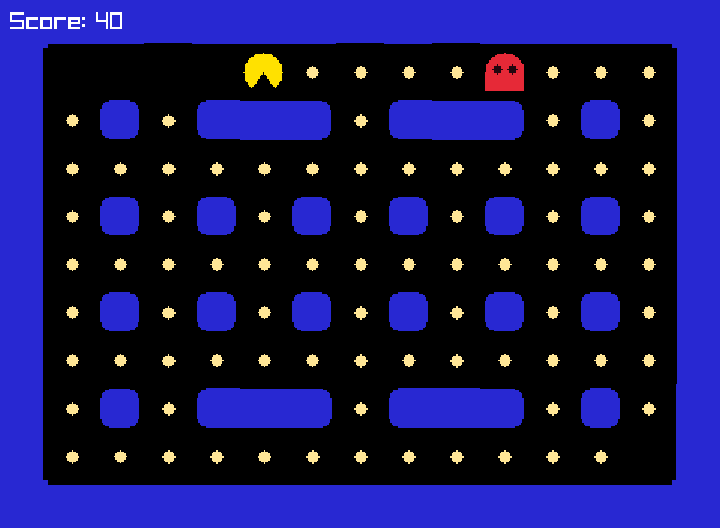
// 第 6 步:吃豆子——吃光所有豆子就贏了!
#include <cstdlib>
#include <string>

#include "GridPlusPlus.h"

using gridpp::GameEngine;
using gridpp::GridObject;
using gridpp::Maze;
using gridpp::Overlay;

const int kCols = 15;
const int kRows = 11;
const char* kMap[kRows] = {
    "###############",
    "#P............#",
    "#.#.###.###.#.#",
    "#.............#",
    "#.#.#.#.#.#.#.#",
    "#.............#",
    "#.#.#.#.#.#.#.#",
    "#.............#",
    "#.#.###.###.#.#",
    "#............G#",
    "###############",
};  // '#' 是牆,'P' 是小精靈的起點,'G' 是鬼的起點

Maze maze;
GridObject pacman;
Overlay message;
bool game_over = false;
Overlay score_label;
int score = 0;
int pellets_left = 0;

// 讓 who 往 (dx, dy) 走一格;前面是牆就不動。
void Walk(GridObject who, int dx, int dy) {
    if (maze.isWall(who.x() + dx, who.y() + dy)) return;
    who.move(dx, dy);
}

void GameOver() {
    game_over = true;
    message.setText("GAME OVER");
    message.show();
}

void Win() {
    game_over = true;
    message.setText("YOU WIN!");
    message.setColor(YELLOW);
    message.show();
}

// 豆子和別的東西撞在同一格時,Engine 會呼叫這個函式。
void EatPellet(GameEngine, GridObject self, GridObject other) {
    if (other.image() != "pacman") return;  // 鬼經過不算,只有小精靈會吃豆子

    self.remove();
    score += 10;
    score_label.setText("Score: " + std::to_string(score));
    pellets_left--;
    if (pellets_left == 0) Win();
}

// 小精靈和別的東西撞在同一格時,Engine 會呼叫這個函式。
void PacmanHit(GameEngine, GridObject, GridObject other) {
    if (other.image() == "ghost") GameOver();
}

void MovePacman(GameEngine game, GridObject self) {
    if (game_over) return;

    if (game.keyPressed(KEY_RIGHT)) {
        self.setDirection(0);
        Walk(self, 1, 0);
    }
    if (game.keyPressed(KEY_UP)) {
        self.setDirection(1);
        Walk(self, 0, -1);
    }
    if (game.keyPressed(KEY_LEFT)) {
        self.setDirection(2);
        Walk(self, -1, 0);
    }
    if (game.keyPressed(KEY_DOWN)) {
        self.setDirection(3);
        Walk(self, 0, 1);
    }
}

const int kDX[4] = {1, 0, -1, 0};  // 方向 0 右、1 上、2 左、3 下
const int kDY[4] = {0, -1, 0, 1};
int ghost_direction = 2;
double ghost_next_move = 0;

// 鬼是不是和小精靈在同一格?
bool Caught(GridObject ghost) { return ghost.x() == pacman.x() && ghost.y() == pacman.y(); }

void ChasePacman(GameEngine game, GridObject self) {
    if (game_over) return;
    if (game.time() < ghost_next_move) return;  // 還沒輪到鬼走
    ghost_next_move = game.time() + 0.3;

    // 走之前先看一眼:小精靈是不是自己撞上來了?
    if (Caught(self)) {
        GameOver();
        return;
    }

    // 看看四個方向,選一條離小精靈最近、而且不用回頭的路。
    int back = (ghost_direction + 2) % 4;
    int best = back;  // 四面都走不通(死路)的時候,只好回頭
    int best_distance = 9999;
    for (int d = 0; d < 4; ++d) {
        if (d == back) continue;
        int x = self.x() + kDX[d];
        int y = self.y() + kDY[d];
        if (maze.isWall(x, y)) continue;
        int distance = std::abs(x - pacman.x()) + std::abs(y - pacman.y());
        if (distance < best_distance) {
            best = d;
            best_distance = distance;
        }
    }
    ghost_direction = best;
    self.move(kDX[best], kDY[best]);

    // 走完再看一眼:是不是撲到小精靈身上了?
    if (Caught(self)) GameOver();
}

int main() {
    GameEngine game(kCols, kRows, 48);
    game.loadAssets("pacman.db");
    game.setBackgroundColor(BLACK);

    maze = game.addMaze(kCols, kRows);
    maze.setWallImages("wall_iso", "wall_end", "wall_straight", "wall_corner", "wall_tee", "wall_cross");
    for (int y = 0; y < kRows; ++y) {
        for (int x = 0; x < kCols; ++x) {
            if (kMap[y][x] == '#') {
                maze.setWall(x, y);
            } else if (kMap[y][x] == '.') {
                GridObject pellet = game.addObject("pellet", nullptr, nullptr, EatPellet);
                pellet.setPosition(x, y);
                pellets_left++;
            }
        }
    }

    pacman = game.addObject("pacman", nullptr, MovePacman, PacmanHit);
    pacman.setPosition(1, 1);

    GridObject ghost = game.addObject("ghost", nullptr, ChasePacman);
    ghost.setPosition(13, 9);
    ghost.setColor(RED);

    message = game.addTextOverlay("GAME OVER", 195, 230, 60, RED);
    message.hide();
    score_label = game.addTextOverlay("Score: 0", 10, 10, 24, WHITE);

    game.run();
    return 0;
}